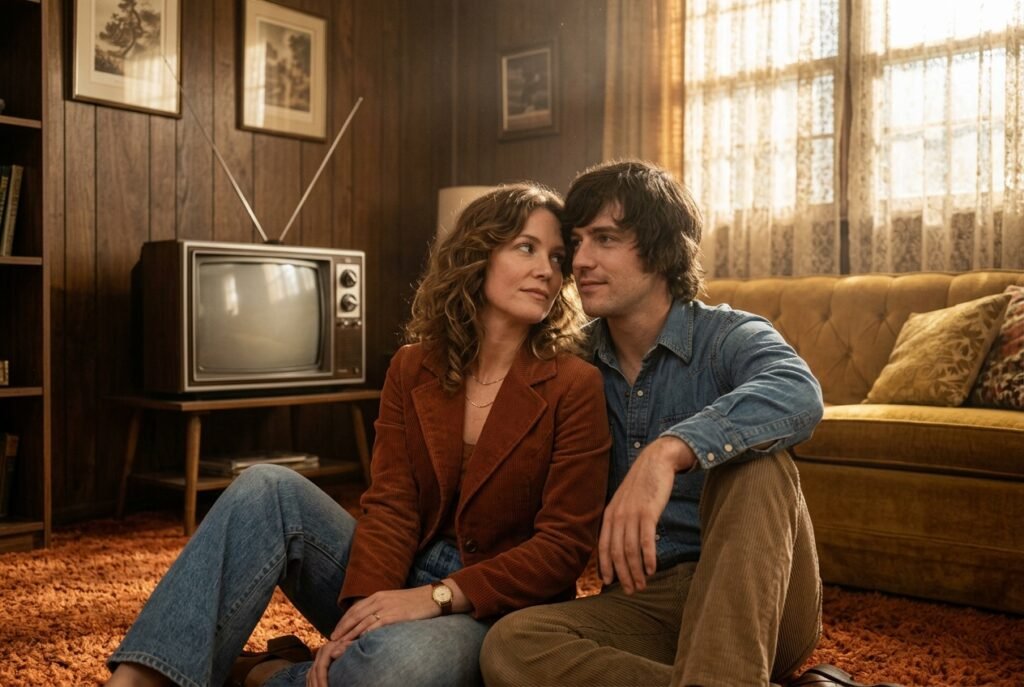
Getting Started with Vintage Aesthetic
When I first started trying to recreate that 70s analog film look, I felt like I was shooting in the dark. It wasn’t until I really worked on the prompt for gemini ai retro style couple photo that the images actually looked authentic rather than just filtered.
Using the Gemini Nano Banana model, the process became much more fluid because it understood the nuances I was asking for. It is available on the web at gemini.google.com and feels like a natural extension of my editing workflow.
Start Simple: I always begin with a base description of the couple and the setting before adding the vintage mood. This gives the AI a solid foundation to work from without confusing the details.
Be Specific: Mentioning the specific film stock, like Portra 400 or Kodak Gold, makes a massive difference in color accuracy.
Natural Poses: I have found that instructing the model to focus on candid, unposed moments works better than asking for a formal portrait.
Focus on Texture: Don’t forget to request film grain or dust specs to sell the retro illusion.
Adjust Light: Always specify the lighting source to ensure the shadows and highlights align with the vintage theme.
What look are you going for in your first attempt?
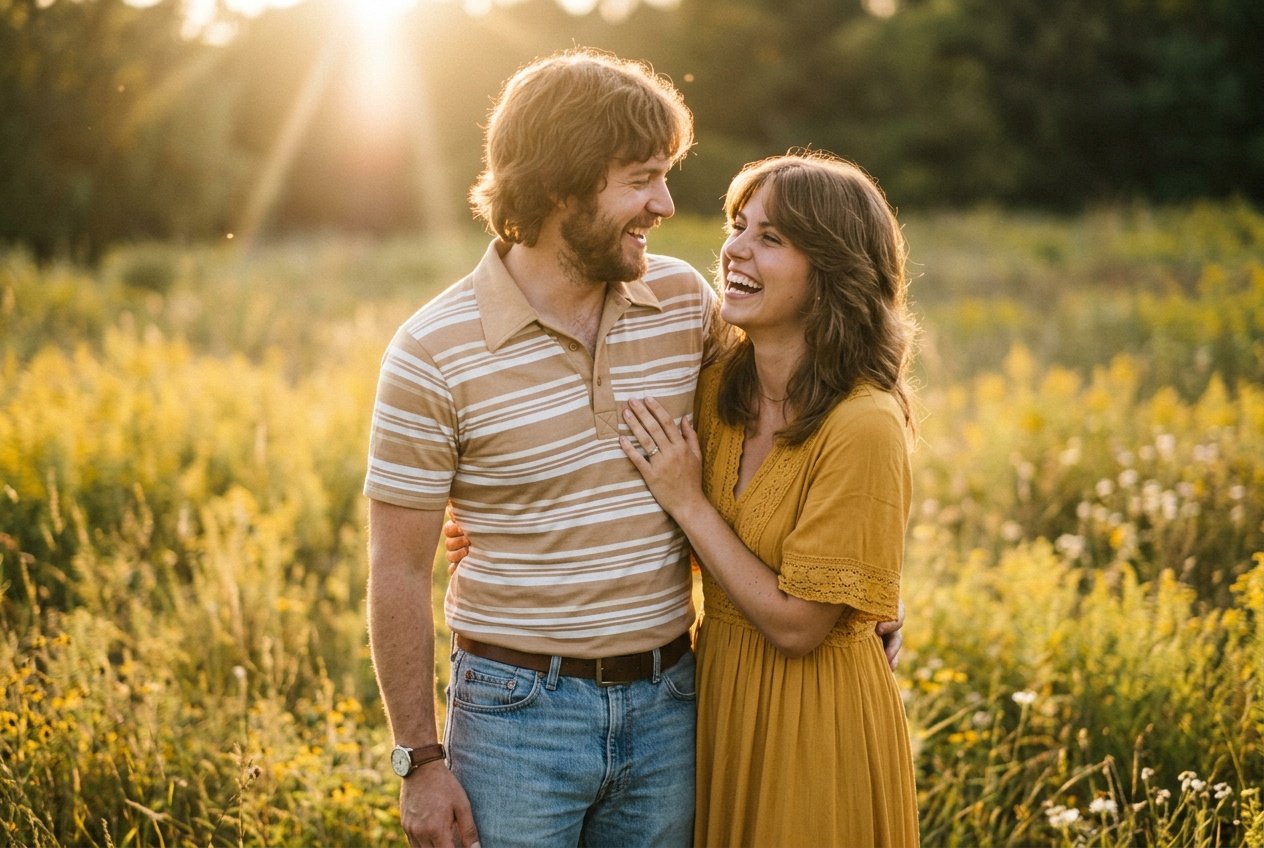
Prompt for: Getting Started with Vintage Aesthetic
Structured Image Prompt — Getting Started with Vintage Aesthetic
{
  "subject": {
    "pose": {
      "head_position": "turned toward each other",
      "body_position": "standing closely",
      "energy": "joyful and candid"
    }
  },
  "attire": {
    "top": {
      "item": "striped polo",
      "color": "tan and white",
      "texture": "cotton",
      "fit": "slim"
    },
    "bottom": {
      "item": "denim jeans",
      "color": "faded blue",
      "texture": "denim"
    },
    "accessories": [
      "leather watch",
      "gold necklace"
    ]
  },
  "environment": {
    "setting": "meadow",
    "background": {
      "type": "outdoor field",
      "color": "golden yellow",
      "texture": "grass",
      "depth": "shallow depth of field"
    },
    "props": [
      "sun flare from top left",
      "scattered wildflowers",
      "soft hazy atmosphere"
    ]
  },
  "photography": {
    "style": "vintage film",
    "shot_scale": "medium shot",
    "lighting": {
      "type": "natural golden hour",
      "source": "low sun",
      "details": "soft highlights, low contrast"
    },
    "camera_gear": {
      "lens": "50mm Prime",
      "aperture": "f/2.8",
      "focus": "sharp focus on couple faces",
      "iso": "400"
    },
    "post_processing": {
      "look": "film grade",
      "grading": "warm sepia and teal"
    }
  },
  "aesthetic_fidelity": {
    "medium": "Analog Film Photography",
    "vibe": "nostalgic and warm",
    "visual_qualities": [
      "film grain",
      "soft focus",
      "muted colors"
    ]
  },
  "constraints": {
    "must_keep": [
      "uploaded person's face and identity",
      "natural features from uploaded photo",
      "user's skin tone",
      "user's expression"
    ],
    "avoid": [
      "distorted face",
      "changed identity",
      "over-exposed",
      "cartoon style"
    ]
  },
  "negative_prompt": [
    "modern digital look",
    "neon lights",
    "sharp contrast",
    "bad hands",
    "distorted limbs",
    "synthetic textures",
    "saturated colors",
    "low resolution"
  ]
}
Setting the Scene for Your Edit
Once I got the lighting right, I turned my attention to the environment. I needed a way to guide the Gemini app so it wouldn’t just default to a modern look.
Refining your gemini ai retro couple prompt
When I use a gemini ai retro couple photo prompt, I always include specific environmental details. I avoid generic terms and instead describe the texture of the walls, the furniture style, or the type of room.
Reference Eras: I find that naming a decade, like ‘mid-70s living room’, helps the model anchor the design elements.
Describe Props: Adding items like a record player or vintage coffee mugs builds a more immersive world.
Lighting Cues: I specify ‘warm lamp lighting’ or ‘filtered window sunlight’ to keep the vibe grounded.
Color Palette: I prefer to describe colors like ‘mustard yellow’ or ‘avocado green’ for that authentic era feel.
Atmosphere: Mentioning ‘slightly dusty air’ or ‘hazy atmosphere’ adds a layer of depth that really sells the retro look.
Does this help you visualize the scene better?
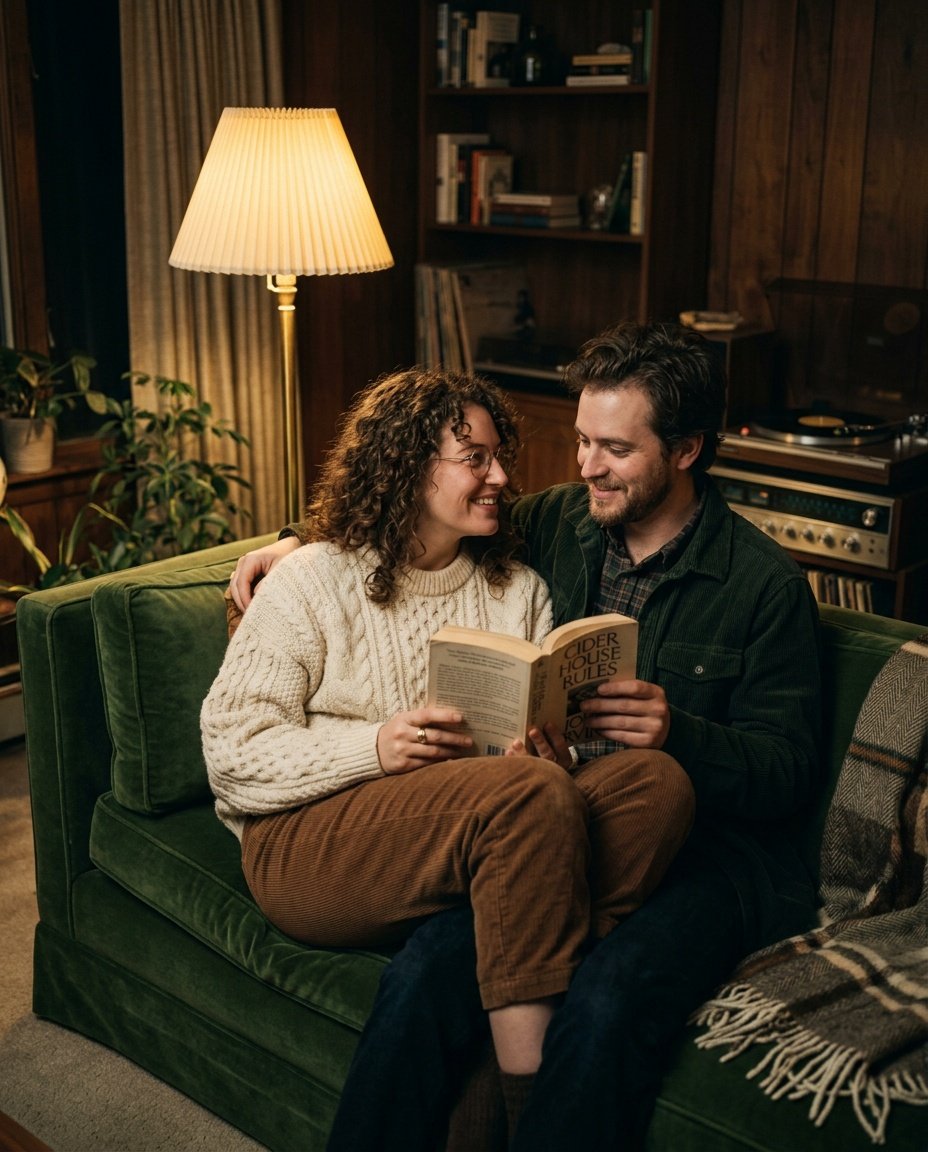
Prompt for: Setting the Scene for Your Edit
Structured Image Prompt — Setting the Scene for Your Edit
{
  "subject": {
    "pose": {
      "head_position": "relaxed",
      "body_position": "sitting on couch",
      "energy": "intimate"
    }
  },
  "attire": {
    "top": {
      "item": "cable-knit sweater",
      "color": "cream",
      "texture": "wool",
      "fit": "oversized"
    },
    "bottom": {
      "item": "corduroy trousers",
      "color": "brown",
      "texture": "corduroy"
    },
    "accessories": [
      "vintage ring",
      "glasses"
    ]
  },
  "environment": {
    "setting": "living room",
    "background": {
      "type": "vintage interior",
      "color": "warm wood",
      "texture": "velvet fabric",
      "depth": "intimate cozy room"
    },
    "props": [
      "turntable in background",
      "paperback book",
      "floor lamp"
    ]
  },
  "photography": {
    "style": "cinematic analog",
    "shot_scale": "medium shot",
    "lighting": {
      "type": "warm artificial",
      "source": "floor lamp",
      "details": "soft warm glow, deep shadow"
    },
    "camera_gear": {
      "lens": "35mm Prime",
      "aperture": "f/1.8",
      "focus": "sharp focus on face",
      "iso": "800"
    },
    "post_processing": {
      "look": "80s cinema",
      "grading": "warm brown tones"
    }
  },
  "aesthetic_fidelity": {
    "medium": "Film Photography",
    "vibe": "cozy nostalgic",
    "visual_qualities": [
      "soft film grain",
      "warm light diffusion",
      "authentic texture"
    ]
  },
  "constraints": {
    "must_keep": [
      "uploaded person's face and identity",
      "natural features from uploaded photo",
      "user's skin tone",
      "user's expression"
    ],
    "avoid": [
      "distorted face",
      "changed identity",
      "over-exposed",
      "cartoon style"
    ]
  },
  "negative_prompt": [
    "modern interior",
    "led strip lighting",
    "too sharp",
    "fake depth",
    "bad hands",
    "plastic texture",
    "smartphone photo",
    "high contrast"
  ]
}
Styling and Posing
One thing I keep coming back to is how much the pose affects the overall mood.
Crafting a retro couple prompt for gemini
When writing a retro couple prompt for gemini, I focus on natural body language. It helps the Nano Banana model create a believable scene rather than an artificial pose.
Avoid Stiff Poses: I suggest actions like walking, laughing, or holding hands, which feel more human.
Outfit Details: Describing fabric textures like denim, wool, or corduroy helps the model render clothing that matches the requested era.
Interaction: I always describe how the two subjects interact, like ‘leaning into each other’ or ‘sharing a look’.
Authentic Context: Placing the couple in a specific activity, like reading or visiting a cafe, makes the image more compelling.
Proportion: I remind myself to keep the subjects as the central focus to ensure they don’t get lost in the background.
Have you tried different poses to see which feels most authentic?
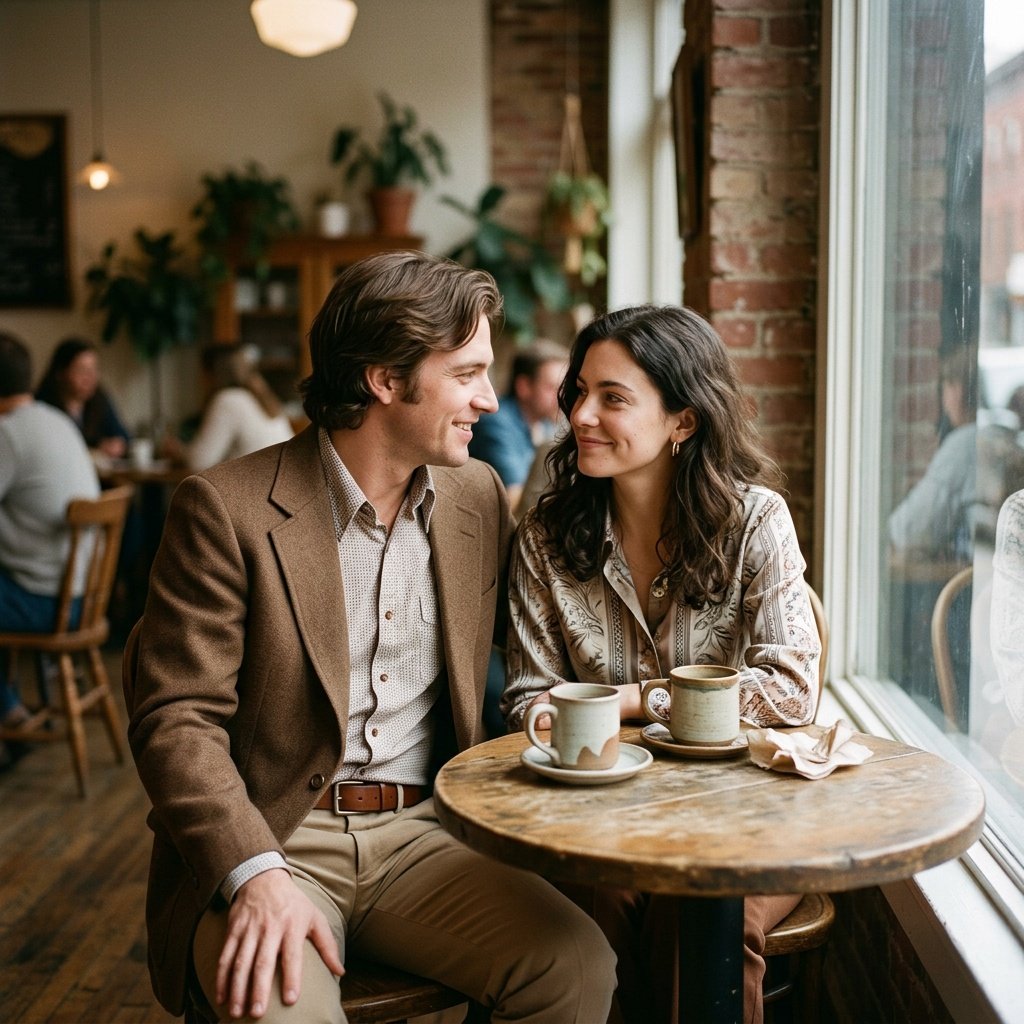
Prompt for: Styling and Posing
Structured Image Prompt — Styling and Posing
{
  "subject": {
    "pose": {
      "head_position": "tilted toward partner",
      "body_position": "sitting at table",
      "energy": "relaxed"
    }
  },
  "attire": {
    "top": {
      "item": "blazer and shirt",
      "color": "brown",
      "texture": "wool",
      "fit": "tailored"
    },
    "bottom": {
      "item": "slacks",
      "color": "tan",
      "texture": "twill"
    },
    "accessories": [
      "leather belt",
      "small hoop earrings"
    ]
  },
  "environment": {
    "setting": "cafe",
    "background": {
      "type": "blurred indoor cafe",
      "color": "neutral brown",
      "texture": "wood grain",
      "depth": "shallow depth"
    },
    "props": [
      "ceramic coffee mugs",
      "round wooden table",
      "window reflections"
    ]
  },
  "photography": {
    "style": "vintage candid",
    "shot_scale": "medium shot",
    "lighting": {
      "type": "diffused window light",
      "source": "large windows",
      "details": "soft light, minimal harsh shadows"
    },
    "camera_gear": {
      "lens": "85mm Prime",
      "aperture": "f/2.0",
      "focus": "sharp eyes",
      "iso": "200"
    },
    "post_processing": {
      "look": "70s vintage",
      "grading": "warm and muted"
    }
  },
  "aesthetic_fidelity": {
    "medium": "Digital Film",
    "vibe": "nostalgic cafe",
    "visual_qualities": [
      "film grain",
      "soft focus",
      "vintage colors"
    ]
  },
  "constraints": {
    "must_keep": [
      "uploaded person's face and identity",
      "natural features from uploaded photo",
      "user's skin tone",
      "user's expression"
    ],
    "avoid": [
      "distorted face",
      "changed identity",
      "over-exposed",
      "cartoon style"
    ]
  },
  "negative_prompt": [
    "bright neon",
    "sharp digital edges",
    "modern electronics",
    "plastic",
    "bad hands",
    "low quality",
    "distorted anatomy",
    "super saturated"
  ]
}
Optimizing Your Results
Getting the lighting and the vibe right is only half the battle. I’ve found that iterating on the prompt for gemini ai retro style couple photo is the best way to get that professional finish.
Using a gemini prompt for couple retro image
When I work with a gemini prompt for couple retro image, I try to keep my descriptions clear. It keeps the output consistent across different sessions.
Layered Details: I add one detail at a time, like the film type or the time of day, to see how it shifts the result.
Ask for Variations: If I’m not happy, I just re-run the same prompt to see how the model interprets it differently.
Focus on Quality: I explicitly request terms like ‘high-resolution film stock’ or ‘authentic aesthetic’ to guide the quality level.
Experiment with Angles: I try requesting ‘low angle’ or ‘eye-level’ shots to change the composition.
Keep it Human: I avoid overly technical jargon, preferring descriptive language that a person would use to describe a scene.
Are you ready to experiment with your own prompts?
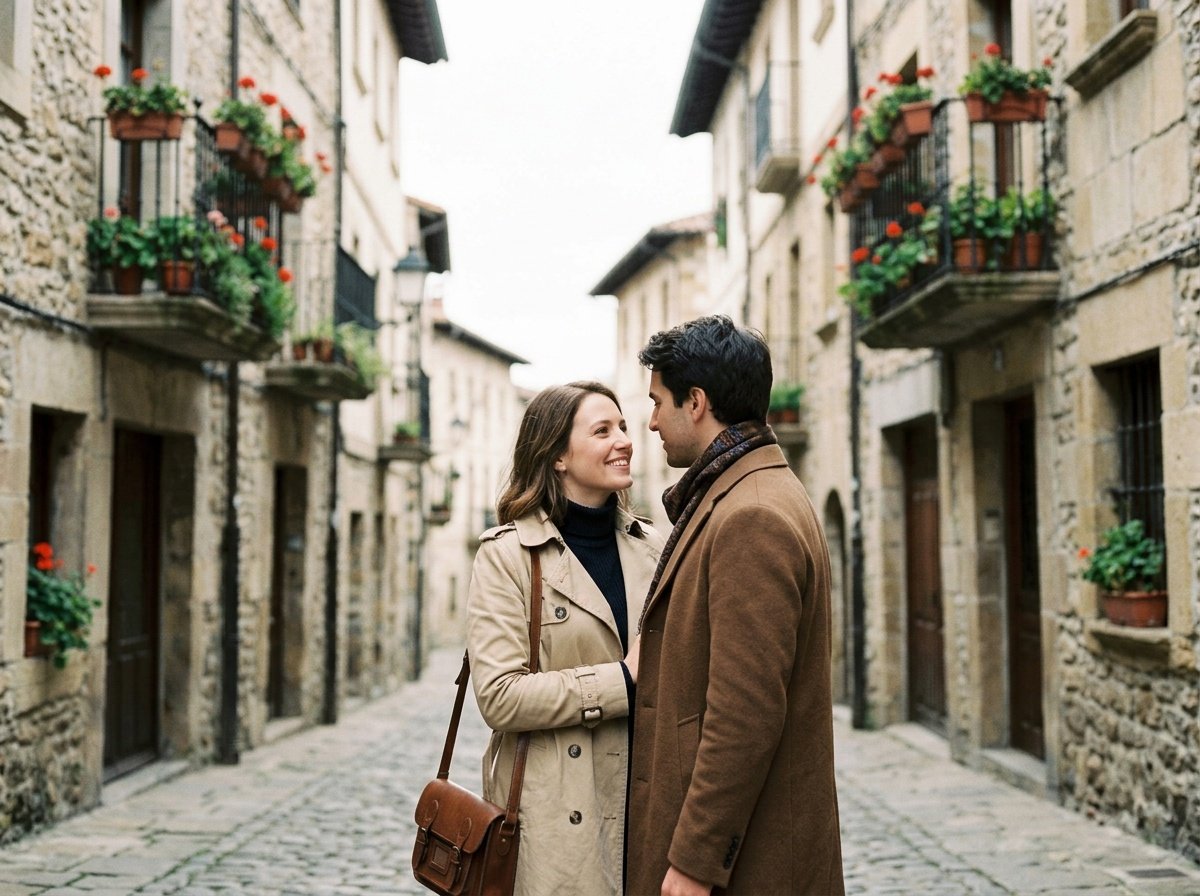
Prompt for: Optimizing Your Results
Structured Image Prompt — Optimizing Your Results
{
  "subject": {
    "pose": {
      "head_position": "slightly angled",
      "body_position": "standing",
      "energy": "romantic"
    }
  },
  "attire": {
    "top": {
      "item": "trench coat",
      "color": "beige",
      "texture": "cotton",
      "fit": "relaxed"
    },
    "bottom": {
      "item": "trousers",
      "color": "dark brown",
      "texture": "wool"
    },
    "accessories": [
      "leather satchel",
      "scarf"
    ]
  },
  "environment": {
    "setting": "cobblestone street",
    "background": {
      "type": "old European town",
      "color": "stone gray",
      "texture": "weathered stone",
      "depth": "medium depth"
    },
    "props": [
      "flower-filled balconies",
      "cobblestone",
      "leather satchel"
    ]
  },
  "photography": {
    "style": "travel portrait",
    "shot_scale": "medium shot",
    "lighting": {
      "type": "diffused daylight",
      "source": "cloudy sky",
      "details": "even light, soft shadows"
    },
    "camera_gear": {
      "lens": "35mm Prime",
      "aperture": "f/2.8",
      "focus": "sharp focus on couple",
      "iso": "100"
    },
    "post_processing": {
      "look": "travel film",
      "grading": "balanced"
    }
  },
  "aesthetic_fidelity": {
    "medium": "35mm Film",
    "vibe": "romantic travel",
    "visual_qualities": [
      "clean film look",
      "muted colors",
      "soft lighting"
    ]
  },
  "constraints": {
    "must_keep": [
      "uploaded person's face and identity",
      "natural features from uploaded photo",
      "user's skin tone",
      "user's expression"
    ],
    "avoid": [
      "distorted face",
      "changed identity",
      "over-exposed",
      "cartoon style"
    ]
  },
  "negative_prompt": [
    "modern cars",
    "signs",
    "electric poles",
    "bad hands",
    "unrealistic skin",
    "fake depth",
    "pixelated",
    "too sharp"
  ]
}
Pro Tips for Better Editing
One thing I keep coming back to is how much the right phrasing changes the outcome. Whether it’s a gemini ai retro couple photo prompt or a specific prompt for gemini ai retro style couple, I’ve noticed that structure matters.
Clarity is Good: I always start my prompt for gemini ai retro style couple with the most important visual elements. It helps the Nano Banana model process the request more accurately.
Iterative Feedback: If the result isn’t quite right, I don’t start over. I tell the Gemini app what I want to change, like ‘make the light warmer’ or ‘soften the grain’.
Check the Composition: I always make sure to describe the framing, like ‘medium shot’ or ‘close up’, to get the result I imagine.
Style Matching: I look for inspiration in old photos and use those descriptions to inform my prompts.
Patience: Sometimes it takes a few tries to get the perfect retro balance, and that’s okay.
Have you experimented with adjusting your prompts mid-session?
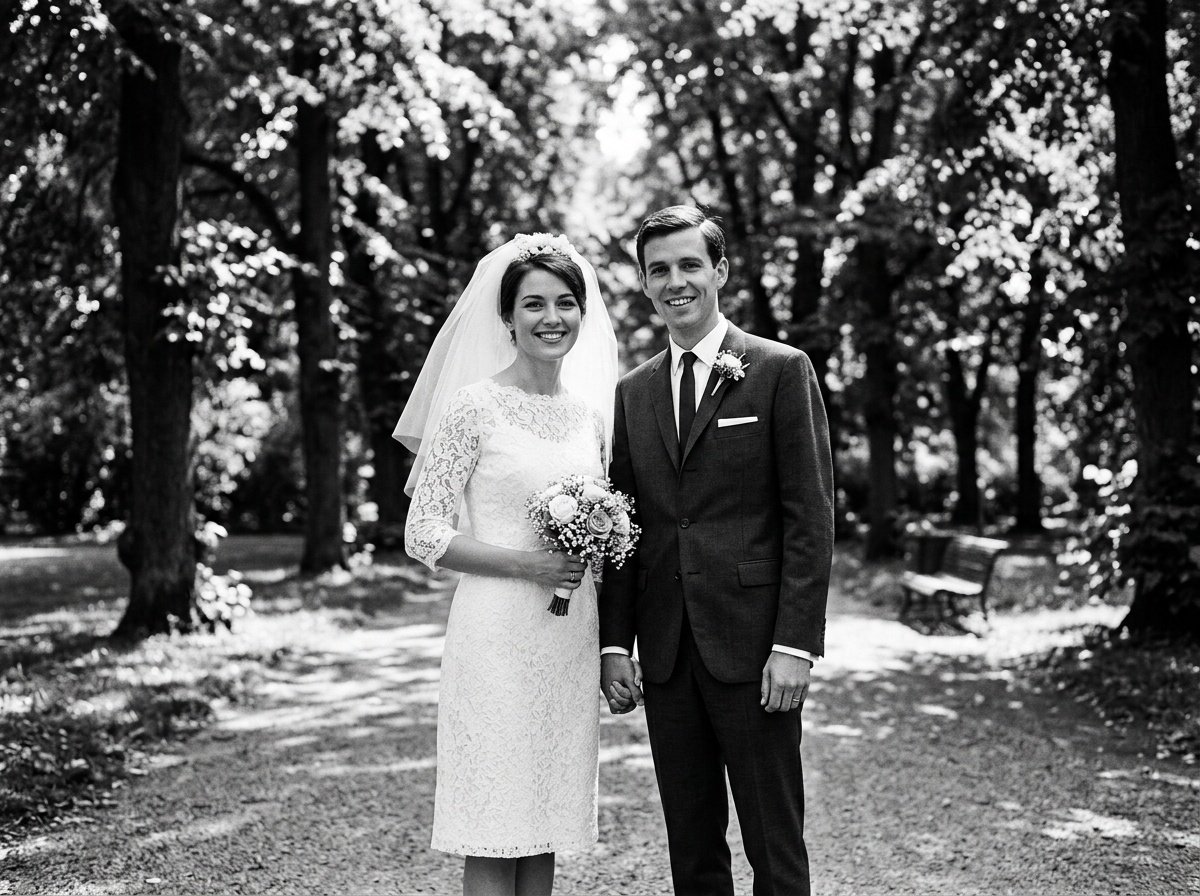
Prompt for: Pro Tips for Better Editing
Structured Image Prompt — Pro Tips for Better Editing
{
  "subject": {
    "pose": {
      "head_position": "looking at camera",
      "body_position": "holding hands",
      "energy": "elegant"
    }
  },
  "attire": {
    "top": {
      "item": "wedding dress / suit",
      "color": "white / black",
      "texture": "lace / wool",
      "fit": "vintage tailored"
    },
    "bottom": {
      "item": "skirt / trousers",
      "color": "white / black",
      "texture": "lace / wool"
    },
    "accessories": [
      "veil",
      "tie"
    ]
  },
  "environment": {
    "setting": "park",
    "background": {
      "type": "mature trees",
      "color": "green",
      "texture": "foliage",
      "depth": "deep"
    },
    "props": [
      "wedding bouquet",
      "dappled light",
      "park bench"
    ]
  },
  "photography": {
    "style": "black and white film",
    "shot_scale": "medium shot",
    "lighting": {
      "type": "dappled sunlight",
      "source": "overhead sun",
      "details": "high contrast, bright highlights"
    },
    "camera_gear": {
      "lens": "50mm Prime",
      "aperture": "f/2.8",
      "focus": "sharp focus",
      "iso": "100"
    },
    "post_processing": {
      "look": "b&w film",
      "grading": "high contrast"
    }
  },
  "aesthetic_fidelity": {
    "medium": "Analog Film",
    "vibe": "elegant classic",
    "visual_qualities": [
      "film grain",
      "high contrast",
      "classic texture"
    ]
  },
  "constraints": {
    "must_keep": [
      "uploaded person's face and identity",
      "natural features from uploaded photo",
      "user's skin tone",
      "user's expression"
    ],
    "avoid": [
      "distorted face",
      "changed identity",
      "over-exposed",
      "cartoon style"
    ]
  },
  "negative_prompt": [
    "color photo",
    "modern makeup",
    "digital glow",
    "bad hands",
    "pixelated",
    "blurred face",
    "modern tech",
    "fake smile"
  ]
}
Final Thoughts
I hope this guide helps you feel more confident about the process. Finding that perfect prompt for gemini ai retro style couple photo is a journey, and I encourage you to keep playing with different styles.
What I’ve learned is that the Nano Banana model handles these requests surprisingly well when you provide enough detail. It’s all about communicating your vision clearly.
Keep Testing: Try a different retro couple gemini prompt each time you edit a photo to see what works.
Stay Simple: Don’t overload the AI with too many constraints at once.
Enjoy the Result: The point is to have fun and make something unique.
Go open the Gemini app on your phone, paste one of these ideas, and see what you can create today!
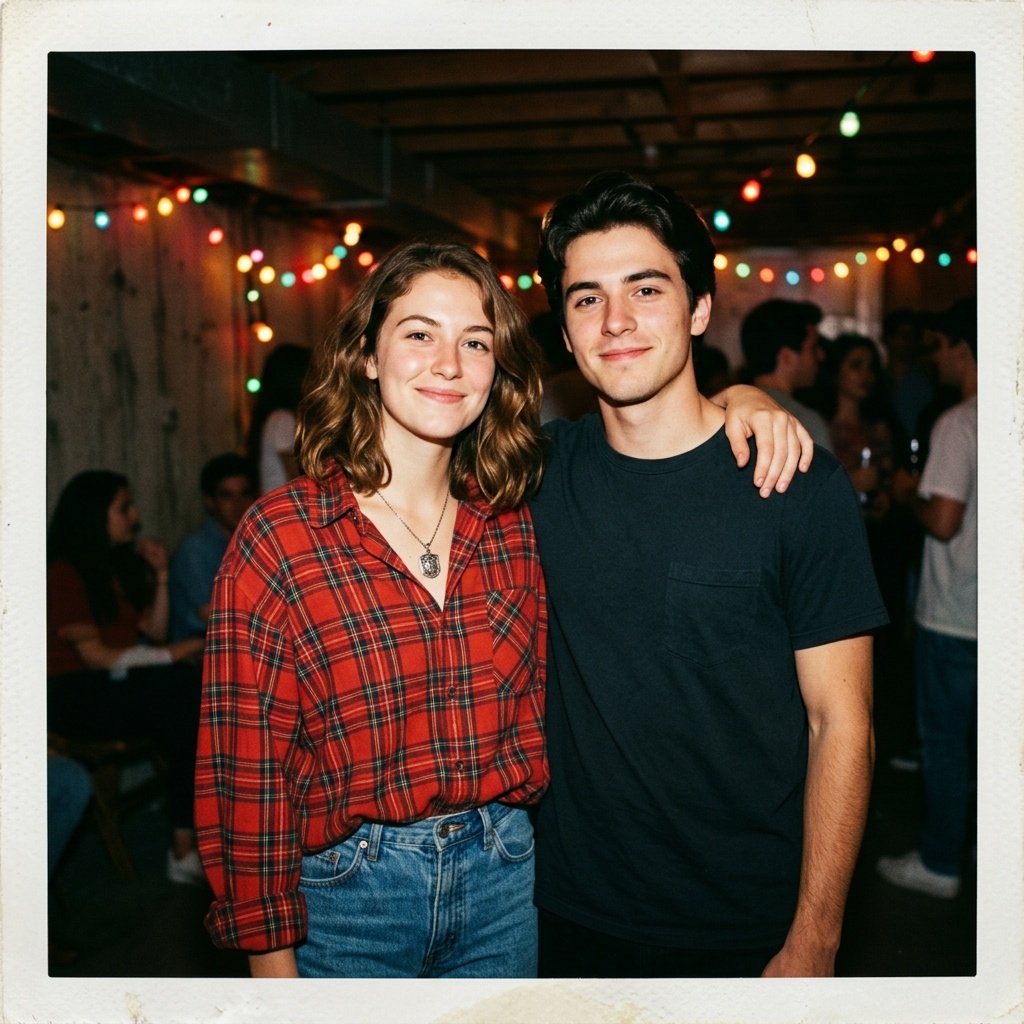
Prompt for: Final Thoughts
Structured Image Prompt — Final Thoughts
{
  "subject": {
    "pose": {
      "head_position": "direct",
      "body_position": "standing",
      "energy": "relaxed"
    }
  },
  "attire": {
    "top": {
      "item": "flannel shirt",
      "color": "red plaid",
      "texture": "flannel",
      "fit": "oversized"
    },
    "bottom": {
      "item": "jeans",
      "color": "blue",
      "texture": "denim"
    },
    "accessories": [
      "vintage necklace"
    ]
  },
  "environment": {
    "setting": "basement party",
    "background": {
      "type": "blurred lights",
      "color": "dark with colorful lights",
      "texture": "wall",
      "depth": "shallow"
    },
    "props": [
      "colorful lights",
      "shadows",
      "flash reflection"
    ]
  },
  "photography": {
    "style": "flash photography",
    "shot_scale": "medium shot",
    "lighting": {
      "type": "on-camera flash",
      "source": "flash",
      "details": "high contrast, overexposed flash"
    },
    "camera_gear": {
      "lens": "35mm Prime",
      "aperture": "f/4.0",
      "focus": "sharp",
      "iso": "800"
    },
    "post_processing": {
      "look": "polaroid",
      "grading": "warm"
    }
  },
  "aesthetic_fidelity": {
    "medium": "Disposable Film",
    "vibe": "90s raw",
    "visual_qualities": [
      "film grain",
      "flash artifacts",
      "soft focus"
    ]
  },
  "constraints": {
    "must_keep": [
      "uploaded person's face and identity",
      "natural features from uploaded photo",
      "user's skin tone",
      "user's expression"
    ],
    "avoid": [
      "distorted face",
      "changed identity",
      "over-exposed",
      "cartoon style"
    ]
  },
  "negative_prompt": [
    "modern neon",
    "hd quality",
    "studio lighting",
    "bad hands",
    "pixelated",
    "perfect skin",
    "professional edit",
    "fake lighting"
  ]
}
❓ Frequently Asked Questions About prompt for gemini ai retro style couple photo
How can I improve my prompt for gemini ai retro style couple photo results?
▼
To improve results, try adding specific details like film types, lighting descriptions, or era-appropriate clothing to your prompt for gemini ai retro style couple photo. Providing more context helps the AI understand the vibe you are looking for.
What is a good gemini ai retro couple photo prompt to start with?
▼
A good gemini ai retro couple photo prompt should include the era, setting, and lighting. For instance, you could describe a 1970s living room with warm lamp lighting to get a nostalgic feel.
How do I refine my couple prompt for gemini ai retro style for better consistency?
▼
You can refine your couple prompt for gemini ai retro style by keeping your core description consistent and changing only the small details, such as the location or the colors, until you get the perfect look.
Is it hard to get a good gemini prompt for couple retro image on the first try?
▼
It is common to iterate when using a gemini prompt for couple retro image. Don’t be discouraged if the first attempt isn’t perfect; simply refine your description and ask for adjustments.
Can I use a retro couple gemini prompt for professional-style edits?
▼
Yes, you can use a retro couple gemini prompt to achieve professional-looking edits by being very specific about camera settings and lighting qualities. Describing high-quality film stock often leads to better professional results.